
175 lines
6.7 KiB
Markdown
175 lines
6.7 KiB
Markdown
# Adaptive Cards
|
|
|
|
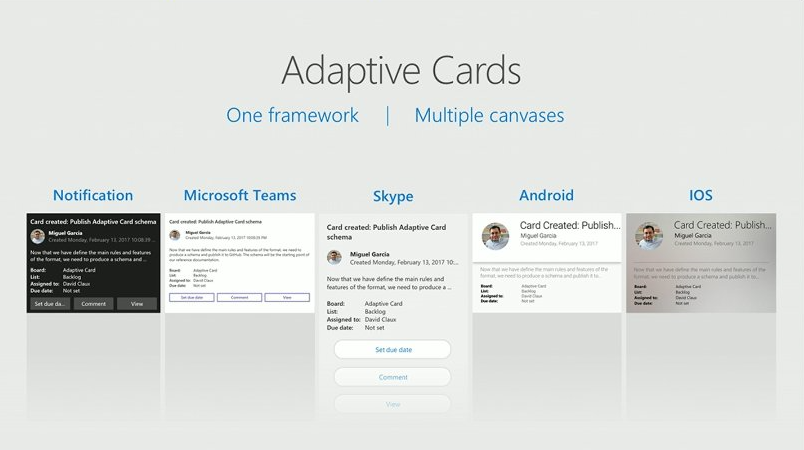
Adaptive Cards are a new way for developers to exchange card content in a common and consistent way.
|
|
|
|
|
|
|
|
## Expressive cards, open framework, multiple platforms
|
|
|
|
Break outside the box of templated cards. Adaptive Cards let you describe your content as you see fit and deliver it beautifully wherever your customers are.
|
|
|
|
The simple open card format enables an ecosystem of shared tooling, seamless integration between producers and consumers, and native cross-platform performance on any device.
|
|
|
|
## Get Started
|
|
|
|
Check out the [full documentation](https://docs.microsoft.com/en-us/adaptive-cards/display/libraries/htmlclient) for more
|
|
|
|
## Breaking changes
|
|
|
|
Please be aware of the following **breaking changes** in particular versions.
|
|
|
|
| In version | Change description |
|
|
|---|---|
|
|
| **1.2** | The default `value` of an Input.Time **no longer accepts seconds**. 08:25:32 will now be treated as an invalid value and ignored; it should be replaced with 08:25. This behavior is consistent with other Adaptive Card renderers.|
|
|
|| The `ICardObject` interface has been **REMOVED**, replaced with the `CardObject` class that both `CardElement` and `Action` extend. This change should have little to no impact on any application.|
|
|
|| The `CardElement.validate()` and `Action.validate()` methods have been **REMOVED**, replaced with `CardObject.validateProperties()` and `CardObject.internalValidateProperties(context: ValidationContext)`. Custom elements and actions now must override `internalValidateProperties` and add validation failures as appropriate to the `context` object passed as a parameter using its `addFailure` method. Be sure to always call `super.internalValidateProperties(context)` in your override.|
|
|
| **1.1** | Due to a security concern, the `processMarkdown` event handler has been **REMOVED**. Setting it will throw an exception that will halt your code. Please change your code to set the `onProcessMarkdown(text, result)` event handler instead (see example below.) |
|
|
| **1.0** | The standalone `renderCard()` helper function was removed as it was redundant with the class methods. Please use `adaptiveCard.render()` as described below. |
|
|
|
|
## Install
|
|
|
|
### Node
|
|
|
|
```console
|
|
npm install adaptivecards --save
|
|
```
|
|
|
|
### CDN
|
|
|
|
The unpkg.com CDN makes it easy to load the script in an browser.
|
|
|
|
The latest release will keep you up to date with features and fixes, but may have breaking changes over time. For maximum stability you should use a specific version.
|
|
|
|
* `adaptivecards.js` - non-minified, useful for dev
|
|
* `adaptivecards.min.js` - minified version, best for production
|
|
|
|
```html
|
|
<!-- Option 1: always load the latest release -->
|
|
<script src="https://unpkg.com/adaptivecards/dist/adaptivecards.min.js"></script>
|
|
|
|
<!-- Option 2: load a specific version (e.g, 1.1.1) -->
|
|
<script src="https://unpkg.com/adaptivecards@1.1.1/dist/adaptivecards.min.js"></script>
|
|
```
|
|
|
|
## Usage
|
|
|
|
### Import the module
|
|
|
|
```js
|
|
// Import the module:
|
|
import * as AdaptiveCards from "adaptivecards";
|
|
|
|
// OR require it:
|
|
var AdaptiveCards = require("adaptivecards");
|
|
|
|
// OR if you loaded via CDN, the global "AdaptiveCards" variable
|
|
// is already defined and can be used directly
|
|
```
|
|
|
|
### Render a card
|
|
|
|
```js
|
|
// Author a card
|
|
// In practice you'll probably get this from a service
|
|
// see http://adaptivecards.io/samples/ for inspiration
|
|
var card = {
|
|
"type": "AdaptiveCard",
|
|
"version": "1.0",
|
|
"body": [
|
|
{
|
|
"type": "Image",
|
|
"url": "http://adaptivecards.io/content/adaptive-card-50.png"
|
|
},
|
|
{
|
|
"type": "TextBlock",
|
|
"text": "Hello **Adaptive Cards!**"
|
|
}
|
|
],
|
|
"actions": [
|
|
{
|
|
"type": "Action.OpenUrl",
|
|
"title": "Learn more",
|
|
"url": "http://adaptivecards.io"
|
|
},
|
|
{
|
|
"type": "Action.OpenUrl",
|
|
"title": "GitHub",
|
|
"url": "http://github.com/Microsoft/AdaptiveCards"
|
|
}
|
|
]
|
|
};
|
|
|
|
// Create an AdaptiveCard instance
|
|
var adaptiveCard = new AdaptiveCards.AdaptiveCard();
|
|
|
|
// Set its hostConfig property unless you want to use the default Host Config
|
|
// Host Config defines the style and behavior of a card
|
|
adaptiveCard.hostConfig = new AdaptiveCards.HostConfig({
|
|
fontFamily: "Segoe UI, Helvetica Neue, sans-serif"
|
|
// More host config options
|
|
});
|
|
|
|
// Set the adaptive card's event handlers. onExecuteAction is invoked
|
|
// whenever an action is clicked in the card
|
|
adaptiveCard.onExecuteAction = function(action) { alert("Ow!"); }
|
|
|
|
// Parse the card payload
|
|
adaptiveCard.parse(card);
|
|
|
|
// Render the card to an HTML element:
|
|
var renderedCard = adaptiveCard.render();
|
|
|
|
// And finally insert it somewhere in your page:
|
|
document.body.appendChild(renderedCard);
|
|
```
|
|
|
|
## Supporting Markdown
|
|
|
|
Markdown is a [standard feature of Adaptive Cards](https://docs.microsoft.com/en-us/adaptive-cards/authoring-cards/text-features), but to give users flexibility we don't bundle a particular implementation with the library.
|
|
|
|
#### Option 1: Markdown-It
|
|
|
|
The easiest way to get markdown support is by adding [markdown-it](https://github.com/markdown-it/markdown-it) to your document.
|
|
|
|
```html
|
|
<script type="text/javascript" src="https://unpkg.com/markdown-it/dist/markdown-it.min.js"></script>
|
|
```
|
|
|
|
#### Option 2: Any other 3rd party library
|
|
|
|
If you want to use another library or handle markdown yourself, use the `AdaptiveCards.onProcessMarkdown` event.
|
|
|
|
**IMPORTANT SECURITY NOTE: When you process Markdown (yourself or using a library) you are responsible for making sure the output HTML is safe.**
|
|
|
|
For example, you must remove `<script>` or other HTML elements that could be injected onto the page.
|
|
|
|
* Failure to do so will make your application susceptible to script injection attacks.
|
|
* Most Markdown libraries, such as `Markdown-It`, offer HTML sanitation.
|
|
|
|
```js
|
|
AdaptiveCards.onProcessMarkdown = function(text, result) {
|
|
result.outputHtml = <your Markdown processing logic>;
|
|
result.didProcess = true;
|
|
}
|
|
```
|
|
|
|
Make sure to set `result.didProcess` to `true`, otherwise the library will consider the input text as not processed and will be treated as plain text.
|
|
|
|
## Webpack
|
|
|
|
If you don't want adaptivecards in your bundle, make sure the script is loaded and add the following the your `webpack.config.json`
|
|
|
|
```js
|
|
module.exports = {
|
|
...
|
|
externals: [
|
|
{ adaptivecards: { var: "AdaptiveCards" } }
|
|
]
|
|
};
|
|
```
|
|
|
|
## Learn more at http://adaptivecards.io
|
|
* [Documentation](http://adaptivecards.io/documentation/)
|
|
* [Schema Explorer](http://adaptivecards.io/explorer/)
|
|
* [Sample Cards](http://adaptivecards.io/samples/)
|
|
* [Interactive Designer](http://adaptivecards.io/designer/)
|